Screens
Ethan (Pro)
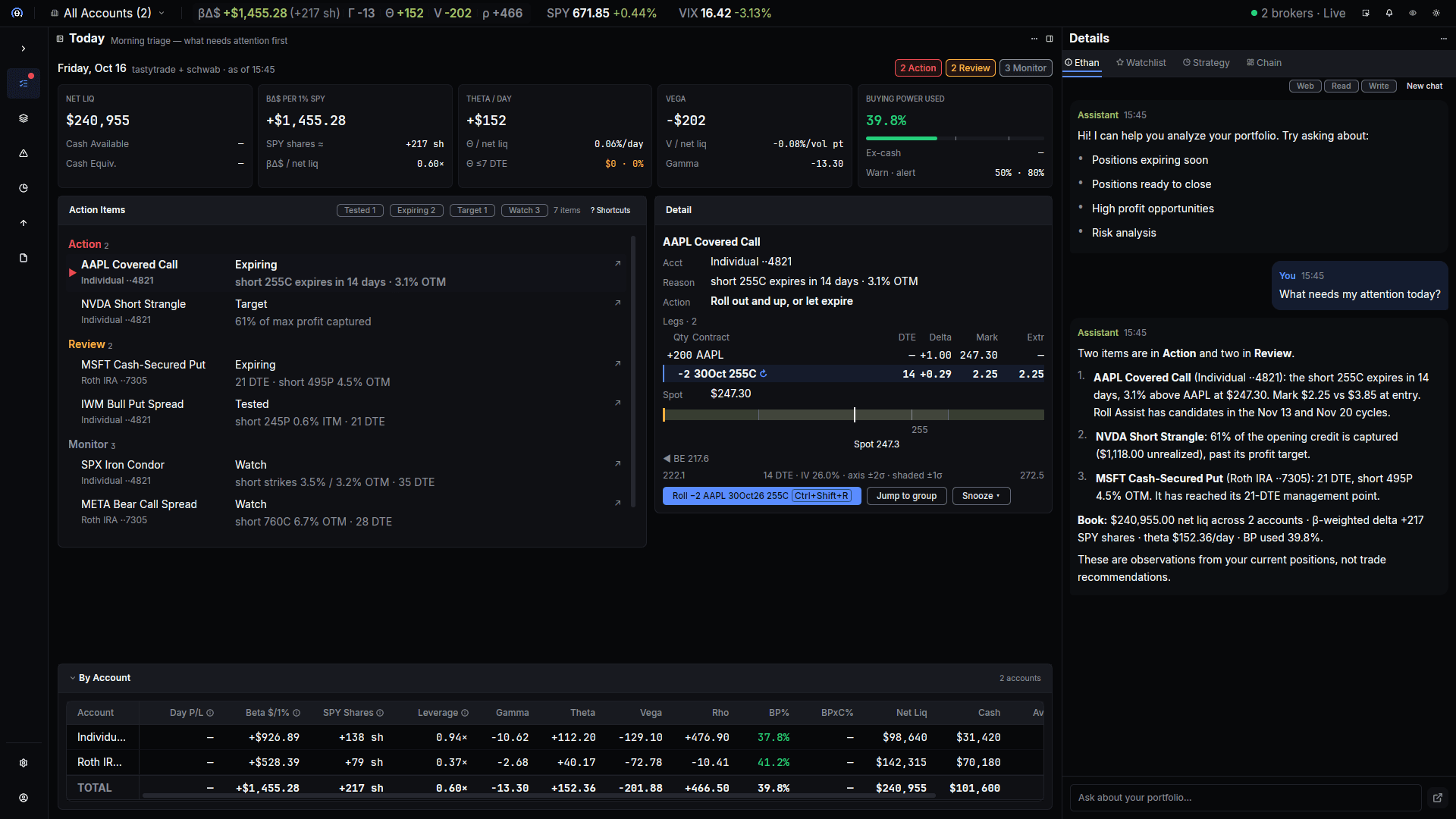
Ethan is the AI assistant in the right-hand rail. Ask about your positions, risk and history in plain English; Ethan answers from the same numbers the app's screens show and never places orders.
Overview
Ethan answers questions about your book: where you stand, what is expiring, how a scenario hits you, which roll candidates exist, what you traded last month. Every figure comes from a ThetaWiz tool that reads the same data the screens use, so Ethan's numbers match Positions, Risk and GEX.
Open Ethan from the Ethan tab in the right-hand rail, next to Watchlist and Strategy. The Ask Ethan card on Performance also opens the chat with a question filled in for you to review and send.
Ethan needs an active Pro subscription. Without one, the Ethan tab is not shown and a request returns "Ethan requires an active Pro subscription". See Pricing.
Choose a provider
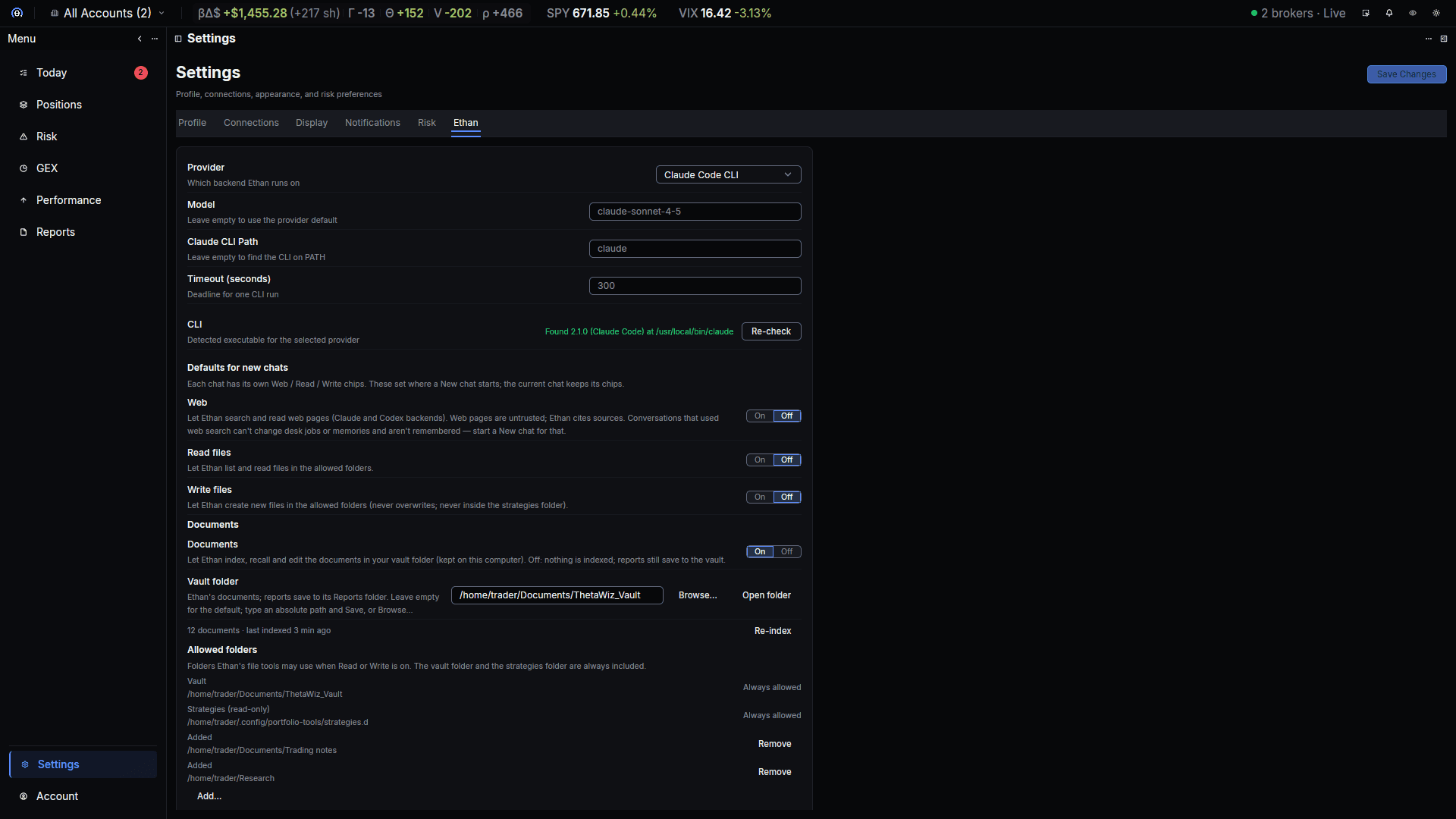
Ethan runs on a language model you choose. ThetaWiz does not supply the model; you use your own CLI login or API key. Set it up in Settings → Ethan: pick a Provider, fill in the fields shown for it, then click Save Ethan Settings. The app shows "Saved. Takes effect after restart." Restart ThetaWiz to use the new provider.
| Provider | What you need | Fields |
|---|---|---|
| Claude Code CLI (default) | The claude command installed on this computer and signed in. | Model (default claude-sonnet-4-5), Claude CLI Path, Timeout (seconds, default 300) |
| Codex CLI | The codex command installed. Sign in with Connect Codex in the same tab. | Model (default: the CLI's own), Codex CLI Path, Timeout (seconds, default 300) |
| Anthropic API | An Anthropic API key. | Model (default claude-sonnet-4-5-20250929), Anthropic API Key |
| OpenAI-compatible | An API key for OpenAI or any OpenAI-compatible endpoint (Groq, vLLM, LM Studio, and others). | Model (default gpt-4o-mini), OpenAI API Key, Base URL (default https://api.openai.com/v1) |
- Model: leave it empty to use the provider's default shown in the box.
- CLI path: leave it empty to find
claudeorcodexon your PATH. The CLI row shows what was found (for example "Found 1.2.3 at /usr/local/bin/claude", or "Not found — install or set a path"). Click Re-check after installing. - Connect Codex runs
codex logininside ThetaWiz's own Codex home, never your~/.codex. Finish the sign-in in your browser; Open in browser and Copy help with the link. The status reads Connected when it worked. The login gives up after 10 minutes. - API keys are stored in the local settings file on this computer.
- Timeout is the deadline for one CLI run.
Web search works only with the Claude Code CLI and Codex CLI providers. On the Anthropic and OpenAI-compatible providers, the chat header shows "web needs Claude/Codex CLI" instead of the Web chip.
The chat panel
- Header: the New chat button and the Web, Read and Write chips for this chat (see Capabilities). New chat is disabled while a reply is in progress.
- Messages: your questions on the right, Ethan's answers on the left. Answers are Markdown with tables, plus the cards described in How answers show their data.
- Input: type a question and send it. In an empty chat, four starter chips appear above the input: Expiring soon, Ready to close, High profit and Needs attention.
What Ethan can and cannot do
Ethan is read-only for trading. It never places, changes or cancels orders, and it does not give specific buy or sell recommendations. It can describe a position's characteristics and show roll candidates for you to weigh.
Ethan is instructed to fetch portfolio figures with a tool and quote them as returned, not to compute P&L, Greeks, buying power or beta-weighted delta itself, and to say so when no tool can answer. These are instructions to the AI model, not checks: its written answer can still contain a mistake, so compare any figure that matters with the cards it attaches or with the app's screens.
The only things Ethan can change, and only when you ask:
- Your Ethan profile and remembered facts (see Memory).
- Report files it saves into your vault's
Reportsfolder. - New files in your allowed folders, when Write is on. It never overwrites an existing file this way.
- Your vault documents, when Write is on: an addition applies right away with Undo; a rewrite is only a draft until you click Apply.
Watchlist and strategy-file changes are always drafts. Ethan shows a card with the proposed change, and nothing is written until you press Apply (or Delete watchlist) on it. Discard closes the card. Draft cards do not survive a restart; ask again after restarting.
- Without the Web chip on, Ethan has no news or fundamentals.
- Ethan treats web pages and document text as data, never as instructions.
What Ethan can look up
Ethan works by calling tools. Some appear only when their data source is connected. In plain terms:
| Area | What Ethan can do |
|---|---|
| Book and positions | Read your book overview (net liq, cash, beta-weighted dollar delta, Greeks, buying-power use, per-account figures, data warnings and freshness). List your strategy groups with the same figures as Positions. Open one group with its legs, Greeks and analysis. List the Today page's Action, Review and Monitor items, without the ones you snoozed. |
| Risk | Read the Risk screen's scenario grid, net Greeks, exposure by underlying and assignment risk. Read the GEX view for one underlying. List roll candidates for one strategy group. |
| Market data | Get current quotes for up to 20 symbols. Read an option chain around the money for one underlying. Read your watchlists and propose changes to them as drafts. |
| History and analysis | Read your trade history (fills by symbol, account and lookback). Summarize results by strategy: trade count, win rate, average win and loss, total P/L and profit factor. Read a 0–5 trend score for a symbol from moving averages and MACD on daily bars, and a market-regime reading. Load built-in review playbooks. |
| Memory and profile | List what it remembers, remember or forget a fact, change your profile, and list what you did in the app recently (Today snoozes, group edits, Roll Assist use). |
| Strategy definitions | Read and validate your custom strategy files, preview what a file would match, find trades that fit no strategy, and propose a strategy file as a draft. |
| Reports | Save a report file as Markdown, CSV, Excel (.xlsx) or Word (.docx) into your vault's Reports folder. |
| Files | List and read files in your allowed folders (Read on), and create new files there (Write on). |
| Documents | List, search and read your vault documents (Read on), and add to or draft rewrites of them (Write on). |
How answers show their data
Ethan writes in your terms, not tool names. You can tell what it looked up from the cards attached to the answer:
- Risk cards: a book snapshot, the scenario grid or roll candidates, each ending in Open Risk →. A GEX card ends in Open GEX →. These cards show the same view the screen does.
- Trade history: a table titled
Trade history: <symbol>. - Saved report: a card reading
Saved report · <format> · <size>with Open and Show in folder. - Drafts: watchlist, strategy-file and document-rewrite cards with Apply and Discard.
- Document edited: "Document edited by Ethan — a backup was kept" with Open and Undo.
- Memory suggestions: "Remember these about you?" with a ✓ and ✕ for each fact.
When a tool reports when its data was generated, Ethan cites that time so you know how fresh the numbers are. See Data freshness.
Web, Read and Write
Each chat has three chips in its header. They apply to this chat only.
| Chip | What it allows |
|---|---|
| Web | Web search and page reading. Claude Code CLI and Codex CLI providers only. Ethan cites the source URL for anything it takes from the web. |
| Read | List and read files in your allowed folders, and search and read your vault documents. |
| Write | Create new files in your allowed folders, and add to or draft rewrites of vault documents. Never overwrites a file, and never writes inside the strategies folder. |
Where a new chat starts is set in Settings → Ethan → Defaults for new chats (Web, Read files, Write files). All three are off by default. Changing a default does not change the current chat's chips.
- Allowed folders: the folders the file tools may use. The vault folder and the strategies folder (read-only) are always included. Use Add… to add one and Remove to take one out.
- Documents (default On): lets Ethan index, recall and edit the documents in your vault folder. Set the Vault folder (default
Documents/ThetaWiz_Vault) with Browse… or by typing a path; Open folder opens it, Re-index rebuilds the index. With Documents off, reports still save to the vault. - A chat that has used web search cannot change your memories or profile, and is not remembered. Start a New chat for that.
Memory
Ethan keeps a personal memory for your ThetaWiz account and follows it without reciting it. It holds:
- Profile: two fields, How to respond (your preferred style) and About me (context about you and your trading). Up to 2,000 characters each.
- Remembered facts: short facts (up to 500 characters) you asked Ethan to remember, or suggestions you approved.
- Suggested facts: facts Ethan noticed in a conversation. They are not used until you approve them, either from the "Remember these about you?" card in the chat or in Settings.
- Conversation summaries: one short summary per chat turn, so Ethan can recall earlier conversations. This costs a small extra model call and is controlled by Remember conversations (summaries + suggested facts) (default On).
- Recent activity: what you did in the app, such as Today snoozes, group edits and Roll Assist use, so you can ask "what did I change this week?".
To view or change it, open Settings → Ethan → Memory. Memories lists each fact with Forget (remembered) or Approve and Reject (suggested). Edit the profile and click Save Profile. You can also ask Ethan in chat to remember or forget something.
Memory syncs to your ThetaWiz account, so it follows you across computers. It syncs every 5 minutes; Sync now runs it at once, and the row shows the last sync time.
A chat that used your vault documents keeps its summaries and remembered facts on this computer only. They show as "this machine only" in Settings and are never synced.
Privacy and masking
To answer, Ethan sends your portfolio data to the provider you chose. Before any text leaves the app, ThetaWiz swaps the identifiers it recognizes (account numbers, your user id, position ids and your home folder path) for stand-ins. It is not a general filter for personal information: a name or other detail you type or keep in a document is sent as it is. Positions, quantities, prices, Greeks and P&L are sent unchanged, because Ethan cannot help without them.
| Data | What the model sees |
|---|---|
| Account number | A random alias such as acct-7K2Q, never derived from the number |
| Account label | Your nickname, or the broker and alias (e.g. Schwab acct-M3XP) |
| Position ids | A stable pos-… token |
| Your user id | user |
| Your home folder | ~ |
| Positions, prices, Greeks, P&L | Unchanged |
| What you type | As written, except that the identifiers above are swapped |
- In the chat you see your own account names. Aliases are swapped back to your nickname, or the short account number, when a message is drawn, and privacy mode applies.
- Aliases are stored with your account, so they are the same on every computer.
- A newly connected account has no alias for a few seconds after its next sync. Until then Ethan gets "account data withheld: alias not ready — reconnect to sync" instead of that data, never a partial result.
- Masking also covers chat history, memory, and the background memory jobs.
- Vault documents never go to ThetaWiz's cloud, but any document text Ethan reads in a chat is sent to the provider, with the same identifier swaps and nothing else removed.
- The Claude and Codex CLIs run in a private, empty working folder outside your home folder (on Windows the path still contains your username).
See Security for what ThetaWiz stores.
Common messages
| Message | What to do |
|---|---|
| Ethan requires an active Pro subscription | Ethan is a Pro feature. See Pricing. |
| Not found — install or set a path | Install the CLI, or enter its full path in Settings → Ethan, then click Re-check. |
| Anthropic provider selected but no API key configured | Enter your Anthropic API key in Settings → Ethan, save, and restart. |
| OpenAI provider selected but no API key configured | Enter your API key in Settings → Ethan, save, and restart. |
| cannot create a private working directory for the CLI agent | The CLI providers need a private working folder. Switch to an API provider, or fix the folder permissions. |
| account data withheld: alias not ready — reconnect to sync | Wait for the account's next sync, or reconnect it, then ask again. |
| Ethan memory is not available yet (sign-in or sync pending). | Wait for sign-in and the first sync to finish. |
| this chat has used your documents; start a new chat to do this | Start a New chat for drafts that sync to your account. |
| Login timed out after 10 minutes. | Click Connect Codex again and finish the browser sign-in. |